Tuesday, 21 February 2012

How to Set up an Outlook Express Email Account

To set up an email address, make sure you are looking at an Outlook Express screen and not a New email screen. Then do the following.
  • From the menu bar, click on Tools
  • From the drop down menu that appears, click on Accounts (one click, left mouse button)
Click Tools > Accounts
  • When you click on Accounts, you get the Internet Accounts dialogue box popping up. Click the Mail tab at the top to see the following:
Click the Mail tab
The Mail tab shows you all the email accounts that you have set up. In the image above, there are no email accounts set up yet. To set up an email account, do the following:
  • Click on the Add button in the top right hand corner
  • A popup menu appears
  • Click Mail with your left mouse button
Click Add > Mail
When you click on Mail, you get an Account Wizard popping up, which will ask you a series of question. We'll run through the various pages of the Wizard in the next part.

CLICK ME FOR READ MORE >>>

Monday, 20 February 2012

Disable USB Storage Devices In Your Desktop And Get Secured

Have your personal information ever been copied or pirated? It might be your years of project or your secret video; you’ll obviously feel not well when you know that it has been copied by someone by accessing your computer. Most of the files are copied to removable storage media like USB drives.
Today in this tutorial, I am going to show you how you can make USB storage devices totally useless without your permission.
You won’t need any special utility or software, just a tweak in Registry editor is enough to enable or disable the USB drive.
To block all the storage device in your Windows, run registry editor by typing regedit in RUN command.
In the registry editor, at left side navigation pane, navigate to following location:

CLICK ME FOR READ MORE >>>

Sunday, 19 February 2012

How To Get Windows Password

This is step by step tutorial that explains how to hack windows password setting backdoor. You probably know that you can change windows password via command prompt (cmd) without knowing old password.
Only problem is access to command prompt without logging in. If you press five times shift key you’ll get a dialog box “sticky keys” on screen, this is the only feature which can be used before logging in at logon screen.

CLICK ME FOR READ MORE >>>

Saturday, 18 February 2012

How To Shutdown A Computer With A Cell Phone/Email

In this tutorial, I am going to teach you how you can control your computer’s basic function using Microsoft Outlook and your Cell Phone Network. For this tutorial I am demonstrating how a user can shutdown, restart, hibernate their computer, just by sending an email from their phone.
To make this happen, all you need is Microsoft Outlook installed on the PC which you want to control from your cell phone
Now let’s begin with the tutorial.
First, you need the batch files to perform the Shutdown, Hibernate operation.
For example,
shutdown -r -t 10 -c “shutting down”
Copy this code and paste it in notepad, save it as shutdown.bat
Now open up Microsoft Outlook. I am assuming that you have already configured it for your Email and I am not going to teach you about setting mail in Microsoft Outlook. Now we will need to make it so that Outlook checks your inbox about every minute.

CLICK ME FOR READ MORE >>>

Unable to delete a file?

Were you ever unable to delete a file?..you click delete and a message like this or like this occurs.
That is when windows are using the program in that instance and the program needs to be shut down. So we go to Task Manager>Processes and find the process and end it.
But what if that process is already ended and we still have the same message appearing over and over again. That happens when Windows still use one of the threads of the process but not the whole process. So, if the process/program is not essential for the OS then we can just delete the file through command prompt;

CLICK ME FOR READ MORE >>>

Friday, 17 February 2012

User Accounts in Windows 7

If you have more than one person using the computer it makes sense to create a user account for them. That way, they can have their own backgrounds, themes, internet settings, etc.
To create a new account, click your picture on the Start menu:
The Windows 7 Start menu, and the picture
This will open up the following screen:
The User Accounts screen

CLICK ME FOR READ MORE >>>

Wednesday, 15 February 2012

Facebook Login Page Help And Troubleshooting


Login Facebook

The following paragraphs act as a guide for people who have troubles connecting to Facebook.com, who have lost or cannot remember their username, password and email, who have their accounts hacked or who experience other error messages while trying to log into Facebook.
Additional information are available at the following pages:

facebook login
facebook login
A forgot your password link is available on all three pages in case the login password cannot be remembered correctly. The Facebook login username is usually the email address that was used in the signup. Facebook users who want to get rid of all the problems related to logging into the social networking site including forgotten passwords or phishing threats should use a password manager like Last Pass, which is available for Firefox, Internet Explorer and Google Chrome, for their login. This password manager remembers the username and password, will automatically fill them into the forms at the homepage and even perform the Facebook log in automatically.
Members who are experiencing other problems that are related to the login page or screen might want to try clearing their web browser cache. Another possibility is to use a different web browser if one is available to see if the login problem exists on that web browser as well which would suggest that it is not a browser setting that is responsible for the Facbook login problems the user experiences.

Facebook Login Tips

  • Never follow links that allegedly lead to the Facebook login , always enter the url directly in your web browser to go there.
  • Always check the website before you start entering your log in information
  • Use a password manager like Last Pass to aid in the login process
  • Select a secure password with at least eight digits and a number
  • Do not hand out your username or password to anyone
  • Change your password the second you suspect the account could be compromised

Facebook Log in Help

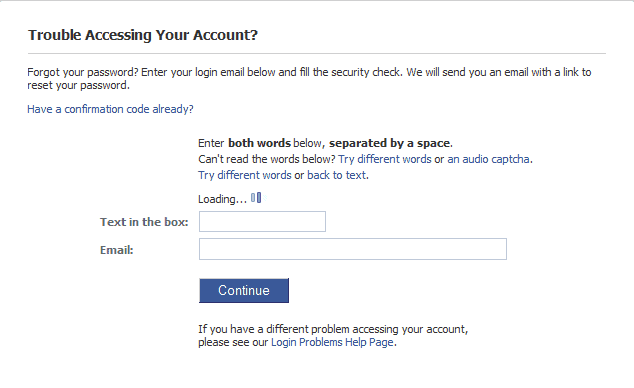
If you have lost or cannot remember your Facebook password, go to: Reset Password page and follow the guide there to restore it.
facebook password reset
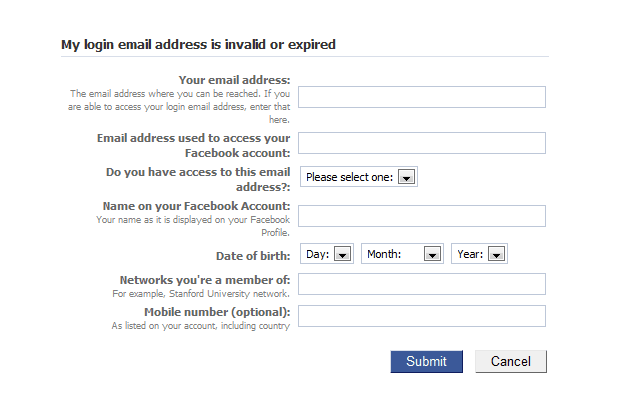
If you do not have access to the email address you signed up with, go to: My login email address is invalid or expired at Facebook to recover it.
login email address
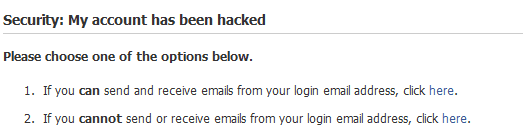
If your Facebook account has been hacked, go to: Security, my Facebook account has been hacked.
facebook account hacked
If you have forgotten your login email address you can try login in with your Facebook account username if you have defined one. You might also ask your friends to look at your profile and retrieve the email address for your. If all else fails go here.
Additional Facebook login information and security tips are available at the Login Helperwebsite.
The troubleshooting guide has shown that face book account holders can face several difficulties when connecting to the social networking site. Some problems are related to technical problems, a blank page or errors on the page for instance, while others are Facebook account related, usually that information such as the email address, username or password are not accepted.
Users who have resolved their log in problems at the site are encouraged to leave a comment to help other users who are experiencing the same login issues.
Updates
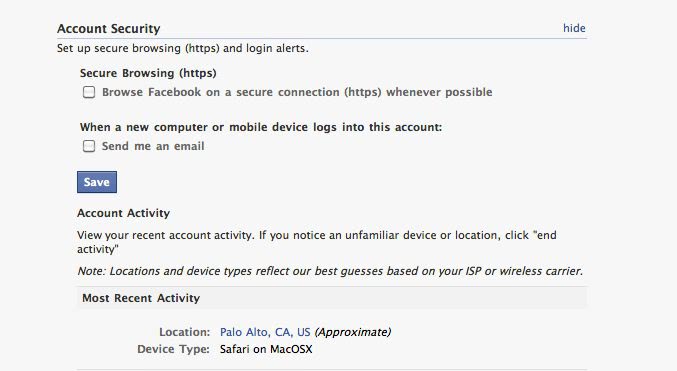
January 26, 2011 – Facebook recently announced a new security related option in the user’s account settings that can be used to enable HTTPS on the whole site. HTTPS, a secure encrypted connection between the local computer and the Facebook website, ensures that no one in the same computer network can listen to that traffic. The change has been announcedhere
Facebook users need to open their Account Settings page where they can check the Secure Browsing checkbox to enable HTTPS for the account.
facebook https
October 12, 2010 – Facebook has launched two new security features. First, the social networking site has launched one time passwords that can be used to log into Facebook with passwords that are only valid for one time. It works by configuring a mobile phone number in the Facebook account settings and then sending otp to 32665 on your mobile phone if you are in the US. Facebook will reply with a one-time password for the login.
The second addition is the ability to log out remotely. If you have forgotten to log out of Facebook you can do that now even if you are not near the device you logged in with. This is handled under Account Security section of your Account Settings page.
facebook remote logout
Stay tuned for additional Facebook login and security updates.
February 14, 2012 – You can harden your Facebook account under Security Settings. Here is a quick rundown of what’s available there:
  • Security Question – This helps Facebook identify you when you try to contact the support for instance.
  • Secure Browsing – Here you can enable https for all connections where the feature is available.
  • Login notifications – Receive emails whenever someone logs into your Facebook account.
  • Login Approvals – This enables two factor authentication on Facebook. You basically get a code send to your mobile phone whenever someone tries to log in from an unrecognized device.
  • App Passwords – This are helpful if you have enabled Facebook login approvals. Some apps do not support the feature and you create special passwords for them here to use them.
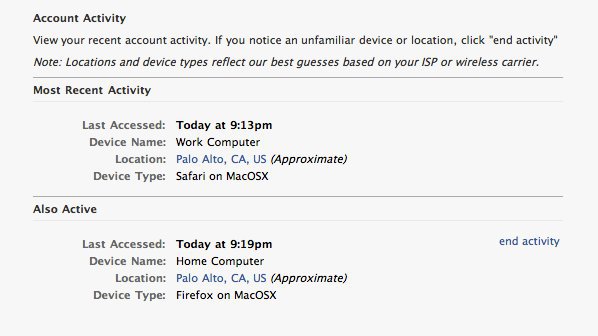
  • Recognized devices – Displays a list of devices that have connected to Facebook recently.
  • Active Sessions – All Facebook sessions that are active.

CLICK ME FOR READ MORE >>>

Saturday, 11 February 2012

Connecting to a SQL Server Express Database with C# .NET

How to Connect to a SQL Server Express Database

To connect to a database using SQL Server Express, you first need to set up a SQL Connection object. You then need something called a connection string to tell C# where the database is.
To set up a connection object, double click the blank form. Just outside of the Form Load event add the following:

System.Data.SqlClient.SqlConnection con;

Your coding window should look like this:

Set up a SqlConnection variable


CLICK ME FOR READ MORE >>>

How to Take Screen Shots on Mac

In this article we have collected all the methods by which you can take a screen shot on your Mac.


1. Command+Shift+3: Takes screen Shot of the whole screen and saves it on the desktop as a PNG Image.

2. Command+Control+Shift+3: Takes  screen shot of the whole screen and saves it in the Clipboard as a PNG Image.


CLICK ME FOR READ MORE >>>
Restoring your computer to a previous date

 Windows XP


CLICK ME FOR READ MORE >>>

Friday, 10 February 2012

Best iTunes Tips and Tools You Should Know

Tips for iTunes

Back Dating: Back date your Albums to them time when you have brought them. For example if someone bought you a Elvis back in 2000 as a gift. Make sure that the date you enter in the library is 2000.

itunes tips Back Dating


CLICK ME FOR READ MORE >>>

Monday, 6 February 2012

How to install Bada 2.0 on Samsung Wave II S8530

Samsung Wave II is a good phone with features like 5mp camera with LED Flash, 3.7’’ capacitive touchscreen, 3G, Front facing Camera, Bluetooth, Wi-Fi etc. But the operating system, Bada 1.2 is not so good considering the hardware of the mobile phone. We have all heard the news about Bada 2.0 update from Samsung, but they didn’t came up with the Official Bada 2.0 and I don’t see them coming up with it anytime soon. There is some good news though, the Unofficial version of the OS is already out and is successfully being run on the device. Some of the main features of Bada 2.0 are:

CLICK ME FOR READ MORE >>>

Saturday, 4 February 2012

5 Ways to Improve Battery Performance on Windows Phone 7

Windows phones have a lot of features and each of these features consumes a lot of battery juice. If you want to use all your apps you need to compromise with your battery performance. All these apps sucks a lot of juice out of your battery. And if you worried about reduced battery performance, here are some tips that could help you boast your battery.
windows-phone-7-series
There are a lot of things you can do to increase your battery performance. Below are some of the ways you can save battery life of your windows phone 7 and make it last longer.
You may also like to checkout our earlier posts about windows keyboard shortcuts, Google maps for Windows 7 phone and how to make computer faster.

CLICK ME FOR READ MORE >>>
Sunday, 29 January 2012

Limited Connectivity Problem Solved


If you are able to connect to a LAN but not to the Internet and if your network manager freaks you showing that you have Limited connectivity.

Here is the solution...

1. Use other static DNS

CLICK ME FOR READ MORE >>>
Friday, 27 January 2012

Run Multiple Instances of GTalk

If you've got many Gmail accounts and don't want to keep logging on and off them every time you switch, a simple command line parameter in the Google Talk shortcut can solve your problem.
  • First, create one copy of the Google Talk shortcut on your desktop - leave the original intact.
  • Right click on this shortcut and choose Properties. The Target box will show you the path of the EXE for Google Talk - something like "C:\Program Files\Google\Google Talk\googletalk.exe"
  • Change this to: "C:\Program Files\Google\Google Talk\googletalk.exe" /nomutex and click OK.

CLICK ME FOR READ MORE >>>

Gtalk Tips and Tricks

Send Bold Text: Text embedded between two * characters is displayed as bold text. Example: This is a *bold* statement.


Send Italics Text: Text embedded between two _(underscore) characters is displayed as italics text. Example: This is an _italics_ statement


Insert Line Breaks: If you want to have a message that spans multiple paragraphs, just hold shift and hit enter


Send mail: Press F9 to send a mail to the contact with whom you are chatting


Restore Google Talk Window: Press Windows Key + Esc to restore Google Talk window from system tray


Call a Contact: Press F11 to start a voice call with the chat contact and F12 to end the voice call


CLICK ME FOR READ MORE >>>

Create Desktop Shortcut To Chat With Your Favorite Gtalk Buddies

A useful trick for google talk users, which allows you to create desktop shortcuts for launching the chat window.

For example, I frequently chat with some person xyz@gmail.com in google talk, so every time I want to chat with him I would need to search and type his name or gmail id in search bar or you can also enable to see all online contacts by enabling the scrollbar.


CLICK ME FOR READ MORE >>>

How to shutdown Windows XP at a specified time?


I wanted to shutdown my system at a specified time. Tried to add a job in the command prompt and it actually worked.

To shutdown when no other process is running, use:
at 07:54 shutdown -s

To shutdown when other processes are running, use:
at 07:54 shutdown -f

This command forces the exes to close!


CLICK ME FOR READ MORE >>>

Hibernating Windows XP from the command prompt


Do you want to hibernate windows from the command prompt?


rundll32.exe powrprof.dll,SetSuspendState


CLICK ME FOR READ MORE >>>

Increase the Number of Simultaneous Downloads

Have you noticed a problem if you try to download more than two files at once from the internet? The default number of simultaneous downloads from a web server is only 2. By tweaking the registry you can increase the number to 10.It is very useful for download freaks like me.


Instructions for Increasing the Number of Simultaneous Downloads


Launch Regedit Navigate to this key:


CLICK ME FOR READ MORE >>>

Recent

Followers

AddUrlYahoo
Powered by Blogger.